
This is probably a niche topic, but it came up recently when a reader asked:
“How do I change the maximum display time setting in Home Assistant?”
Fortunately, Helge was kind enough to provide an answer.
In Home Assistant, you can adjust settings like Fade Time, Matting, and Time Delay using sliders. However, the maximum value for Time Delay is capped at 400 seconds, which might not be sufficient for some users. (I originally wrote "Fade Time" here, which was wrong — as the code block further down shows, 400 is the cap on time_delay; fade_time is capped at 50.)
If you are on picframe3: none of this applies, and there is nothing to edit. The interval is a normal setting — Seconds per picture in the web interface, and a number entity in Home Assistant that goes from 5 seconds to 3600 seconds (one hour) without touching any source file. You can also set it from the command line with picframe3 config --set slideshow.interval=600. The rest of this article is for the old pi3d PictureFrame.
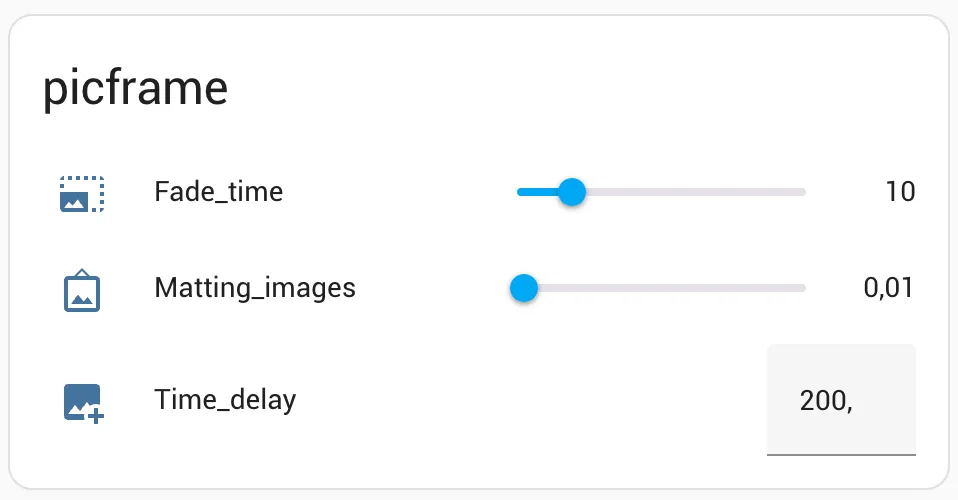
Here is how to change it:
Navigate to
/home/pi/venv_picframe/lib/python3.11/site-packages/picframe/interface_mqtt.py
and open the file.
Two things about that path. The python3.11 part is whatever Python version your virtual environment was built with — that was right on Bookworm, but Trixie ships Python 3.13, so the directory will be python3.13 there. Run ls /home/pi/venv_picframe/lib/ to see which one you actually have. And if you set your Pi up recently there is no pi user any more, so substitute your own home directory.
Look for this section — a line number in a third-party package is not worth quoting, so search for __setup_number instead:
        # numbers
        self.__setup_number(client, "brightness", 0.0, 1.0, 0.1, "mdi:brightness-6", available_topic)
        self.__setup_number(client, "time_delay", 1, 400, 1, "mdi:image-plus", available_topic)
        self.__setup_number(client, "fade_time", 1, 50, 1, "mdi:image-size-select-large", available_topic)
        self.__setup_number(client, "matting_images", 0.0, 1.0, 0.01, "mdi:image-frame", available_topic)
and change the second numerical value to whatever you want it to be.
Save your changes and reboot. You should now be able to set the Time Delay to your desired maximum value.
Was this article helpful?
Thank you for your support and motivation.